1. Goto SE16N t-code and enter &sap_edit then you will be able to change the content of SAP standard tables.
2. SE21 is the t-code from which we can create PACKAGE and package always needs a transport request , can't be stored in local object.
3. SE17 --> if you wanna see and down load the selected table contents.
4. All SAP Requests store in table TST03 .
5. Some more tables for requests storing E070 and E071.
Wednesday, January 6, 2010

Wednesday, December 30, 2009
Text table creation!!
First create table say YRG_FIRST_TABLE with the displayed fields (language field is mandetory).

Create second table YRG_SECOND_TABLE with displayed fields but keep in mind the primary key must be same as first table. and language field is must.

Below screen is for generating proposal with first table as check table.

This way you check the text table for table YRG_FIRST_TABLE


Create second table YRG_SECOND_TABLE with displayed fields but keep in mind the primary key must be same as first table. and language field is must.

Below screen is for generating proposal with first table as check table.

This way you check the text table for table YRG_FIRST_TABLE

In these table i used append and include structures:
Append structure : are table specific, can't be used in any other table and append stucture must be used in last because after this we can not add other fields in table.
Include structure : are not table specific and can be used any where in table.
Tuesday, December 29, 2009
Status icons in screen programming @@@
There is a master database table ICON where we have all status icons in SAP but i used the table ICONT as function module ICON_CREATE uses this table. We need to write the code in PBO as i wanted to display the status icons.
In Table ICON you can get all technical names of status icons :
like : ICON_TOTAL_LEFT or ICON_CREATE_NOTE etc . You pass these names to the below function module and will get the result .

In Table ICON you can get all technical names of status icons :
like : ICON_TOTAL_LEFT or ICON_CREATE_NOTE etc . You pass these names to the below function module and will get the result .


Sunday, December 20, 2009


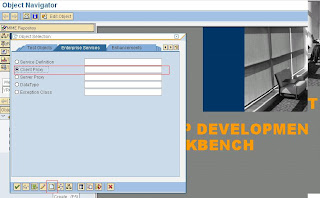
Fetch the data from different sap server through proxy class (ins zoom) !!
This is how we create proxy class. My requirement was to fetch the visa details which are stored on different server by employee number.

we need to select enterprise services.


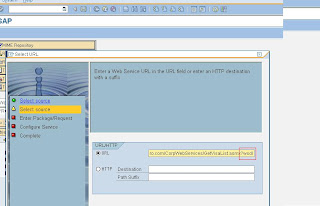
Here we should the URL appending ?WSDL.



This the proxy class which is automatically created


we need to select enterprise services.


Here we should the URL appending ?WSDL.


This the proxy class which is automatically created

Now to fetch the data we need to create LOGICAL PORT in each and every client. which will be created by t-code SOAMANAGER. we will in next blog.
Monday, December 14, 2009
Road-map in web dynpro !!!!!


i created 4 different views first, second,third and forth and each view there is a inbound plug from_main. And in main view there are four outbound plug to_first , to_second,to_third and to_forth and i embedded each view with main view and also create navigation link also.

Here i need to initialize the default step in road map so i wrote set the step as step1 in WDDOINIT method.

This is the method on button next same ways i wrote on action of button previous.


Here i created one method in main view onnavigate corresponding to each step.

Sunday, December 13, 2009
Download adobe form in PDF format in web dynpro!!!


For this i created one adobe form zcertificate from t-code SFP.
Subscribe to:
Comments (Atom)