Wednesday, August 25, 2010

Concept of widen and narrow casting !!!!!

Narrow and widen casting


The code will not give any result incase of widen casting and if you are not putting the code with in try and endtry it will give you short dump. So

Always do narrow casting before widen casting.

Monday, August 23, 2010

FallBack class in BADI implementation !!!

What is BADI ? ---> In my openion BADI(Business application addition) is the way to enhance sap standard code through object oriented concept and it provides an interface for which there can be multiple or single implementations(depends on the requirement).

Fallback class : --> If any BADI doesn't have any implementation or you can say implementation class (as interface needs one class) that time the FALLBACK class is executed. If any implementation is there FALL BACK will not come into the picture.


GET BADI and CALL BADI are the syntax to call your custom BADI.

Shared Memory object concept !!!!!!!!!

This is one of the best blogs which i am writing :
Requirement : -> Usually we store and fetch the data from the database table but some times we have to put our data into the buffer for a period of time so that later period of time we can fetch it from buffer , accumulate it and finally update in database tables. Normally we use EXPORT/IMPORT with buffer area extension but in next generation ABAP developement methodology we have a concept of shared memory object : T-CODE : -> SHMA & SHMM

Now while developing this functionality , there are two kinds of classes :
1. Root class
2. Shared Memory area class (Automatically generated)
Below is the root class with shared memory check box enabled


Now goto the t-code SHMA and you'll find the below screen.

Below are the methods of shared memory object class
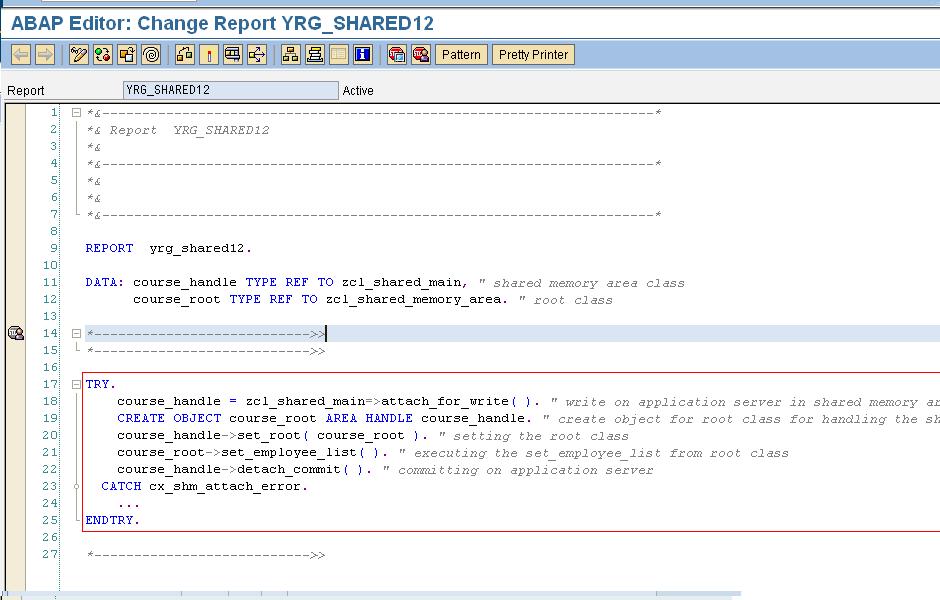
Below is the program to dump the data in shared memory area :

Below is the program to read the data from shared memory area not from data base table


Thursday, August 5, 2010

Creating the custom button in web dynpro ALV

My requirement was to add a new custom button in web dynpro ALV.


Create one web dynpro component and use the used component named as SALV_WD_TABLE.

Write the below code.


Thursday, July 22, 2010

Dynamic pattern in se38 pattern.... ^^^^


This may seem little silly requirement but i did for fun. Normally we want to write all the descriptions about the program , that can can through dynamic pattern.
1. Goto SE38 and follow as below.

2. Give the name of your pattern.

3. Now click on ok and write below syntax and save it.

4. Now goto t-code CMOD and create one project.

5. Now click on Enhancement assignment button as given on above screen. Now pass the below user exit name .

6. Now click on component button , you will see below screen. Double click on red colored area.

7. Now you will a include program. Double click on the include program.
8. Write the below peice of code and activate it.

Wednesday, July 21, 2010

Get the F1 help in selection screen@@@@2

First goto t-code SE61 and create the text which you want for the F4 help and then follow the procedure as mentioned in below screen shot.